What To Do In A Hackathon As A Beginner – Complete Guide For Newcomers
7 min read
●
Updated 31 July 2026
First hackathon? Discover exactly what successful beginners do before, during, and after a hackathon to avoid common mistakes, build confidently, and stand out.
Your first hackathon comes down to five decisions: pick a beginner-friendly event, form a balanced 3–5 person team, spend the first hour understanding the problem (not coding), build one thing that works over three things that don't, and rehearse a 3-minute pitch as seriously as the build itself. This guide is a step-by-step operating manual for a hackathon for beginners - not just tips - covering the 7 days before, the first 60 minutes, hour-by-hour priorities, and what judges are actually scoring.
The Beginner Priority Pyramid
Most first-timers at beginner hackathons get the order of priorities backwards. Here's the actual hierarchy, bottom to top - each layer only matters once the one below it is solid:
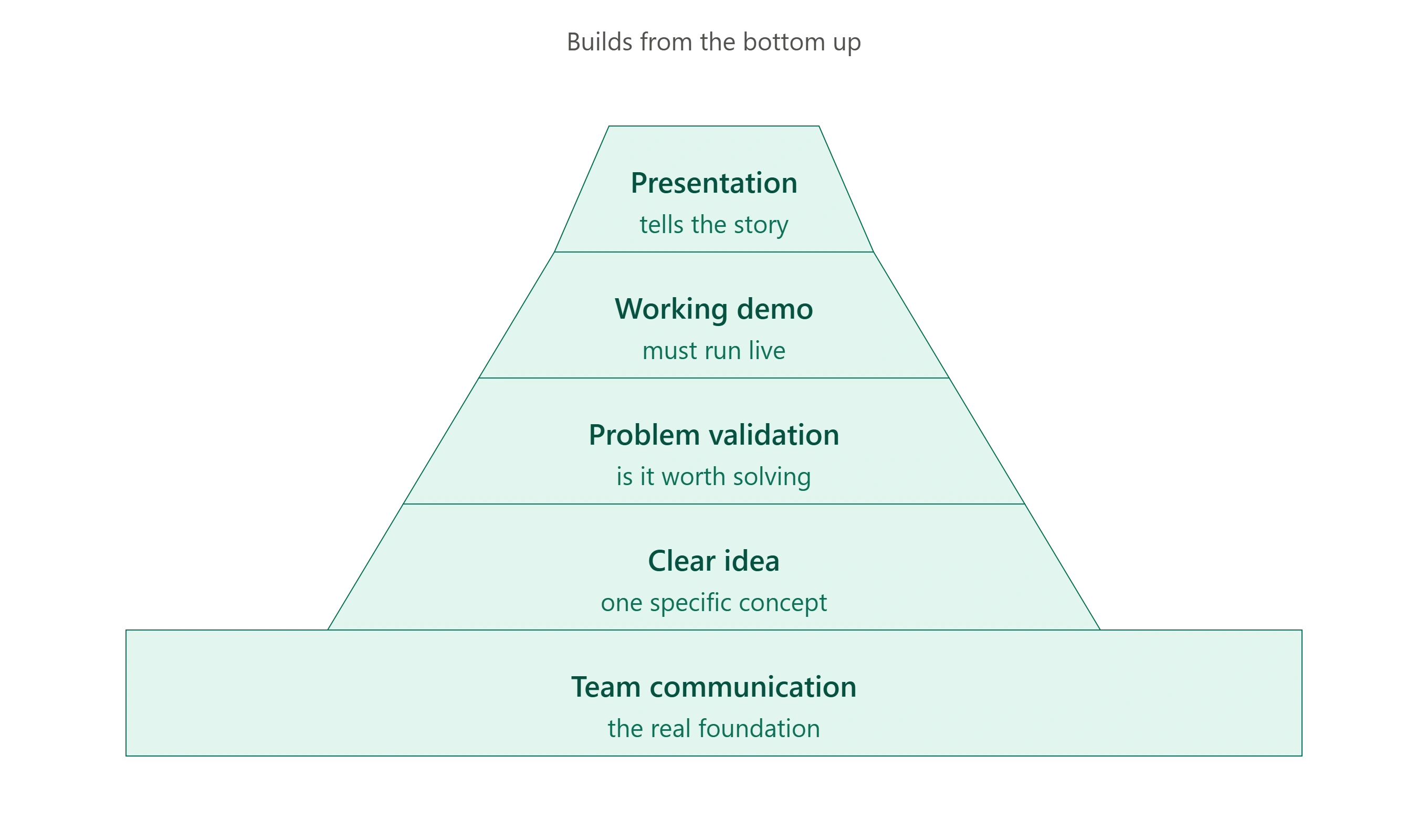
A polished pitch for a demo that doesn't run beats a brilliant idea with no working demo, every time. Teams that skip straight to presentation without a working layer underneath tend to lose to teams with rougher builds that actually function.
Beginner Rule: If your MVP can't be demoed in under 90 seconds, it's probably too big for a 24–48 hour hackathon. Cut scope until the demo fits in 90 seconds - that constraint alone prevents most beginner over-building.
The 7-Day Hackathon Timeline
A hackathon roadmap for beginners, one checkpoint at a time:
When | What To Do |
| 7 days before | Confirm your team, check the problem statement themes/tracks, install and test your core tools (IDE, design tool, GitHub) |
| 1 day before | Pack your kit (see checklist below), sleep properly, review the judging criteria if published |
| Opening hour | Read the full problem statement as a team, ask clarifying questions, don't touch code yet |
| First 6 hours | Lock the idea, split roles, build the core function only — no polish |
| Final hour | Stop building. Rehearse the pitch. Test the demo end-to-end at least twice |
| Post-submission | Note what worked and what didn't - this is what actually improves your second hackathon |
First 60 Minutes Plan
This is the window most beginners waste. A tighter breakdown:
- 0–15 min: Read the problem statement fully, as a team, out loud if needed. No solutioning yet.
- 15–30 min: Each person proposes one interpretation of the problem. Pick the one most feasible in the time available, not the most ambitious.
- 30–45 min: Assign roles - who builds, who designs, who owns the pitch narrative. Set up your repo/workspace.
- 45–60 min: Start the smallest possible working version of the core feature. Nothing else yet.
Beginner Decision Matrix
The right move at a hackathon for beginners often depends on your specific situation, not a one-size-fits-all rule:
Situation | Do This |
| First hackathon ever | Use tech you already know - don't learn a new framework mid-event |
| New team, haven't worked together before | Meet (even briefly, online) before the event to align on tools and roles |
| No coding experience | Focus on UX design, user research, or documentation - hackathons need all three |
| Competing solo | Cut your scope further than you think you need to |
| Running out of time mid-build | Protect the demo path first; cut every feature that isn't on it |
What Judges Actually Look For
Beginners often over-invest in idea originality and under-invest in the things judges actually score. Standard hackathon judging typically weighs:
- Problem-solution fit - does the project address a real, clearly stated problem?
- Technical execution - does the demo actually work, live, without a workaround?
- Feasibility & impact - could this plausibly go further than the hackathon?
- Presentation clarity - can the team explain what they built and why in under 5 minutes?
A common beginner mistake: over-indexing on idea originality while under-indexing on whether the demo runs cleanly. Judges consistently reward a working, well-explained MVP over an ambitious idea that only partially works.
Can You Win Your First Hackathon?
Yes - and more often than beginners expect. Beginner-track judging usually weighs execution and clarity over prior experience, so a well-scoped, fully working project from a first-timer can outscore an ambitious, half-finished one from a veteran team. The deciding factor is almost always scope discipline: teams that build less, but make it work end-to-end, tend to outperform teams that reach for something bigger than the timeframe allows.
Should Beginners Use AI Tools?
Relevant heading into 2026: yes, with two conditions. AI coding assistants (like Claude, ChatGPT, or GitHub Copilot) are commonly permitted in hackathons and can meaningfully speed up boilerplate code, debugging, and documentation. But:
(1) check the specific event's rules - some restrict AI-generated code or require disclosure, and
(2) make sure your team can explain and defend every part of the build in the judging Q&A - a demo you can't explain under questioning counts against you, regardless of who or what wrote the code.
Beginner Packing Checklist
What to actually pack for beginner hackathons, in-person or hybrid:
- Laptop + charger
- Extension cord / power strip
- Mouse (trackpads slow you down over 24+ hours)
- Water bottle
- Notebook (for the brainstorm phase - paper is faster than a doc for this)
- Headphones
- Mobile hotspot / internet backup
- A change of clothes if it's in-person and overnight
Common Beginner Mistakes
These are the mistakes that show up most often at hackathons for beginners:
Mistake | Why it hurts | Fix |
| Skipping the planning phase | Leads to confused, wasted build time | Spend the first hour on problem clarity, not code |
| Overcomplicating the idea | Runs out of time before it works | Scope to what fits in a 90-second demo |
| Weak presentation | Strong builds lose to weak pitches | Rehearse the pitch as much as the build |
| Not using mentors | Missed course-correction | Check in with a mentor at least once |
| Skipping rest | Burnout drops team output late-stage | Schedule short breaks, especially overnight |
A pattern worth naming: many first-time teams feel pressure to start coding immediately. In practice, spending the first 30–60 minutes understanding the problem is usually what separates a working demo from a last-hour scramble.
Frequently Asked Questions (FAQs)
1. Can beginners do hackathons?
Yes. Many hackathons are designed specifically for beginners and welcome participants with little or no prior hackathon experience. Beginner-friendly events often provide onboarding sessions, mentor support, workshops, and problem statements suitable for first-time teams.
You don't need to be an expert programmer to participate. Teams often include designers, researchers, presenters, and business students alongside developers. The main goal is learning, collaboration, and building a working solution within a limited time.
2. How to prepare for a hackathon for beginners?
Start preparing a few days before the event rather than on the day it begins. Confirm your team, install and test the tools you'll use, read the event rules and judging criteria, and become familiar with the problem themes if they're available.
During the hackathon, focus on understanding the problem before writing code, build a simple working MVP instead of too many features, and leave enough time to test your demo and rehearse your presentation.
3. How do I find beginner hackathons?
You can find beginner hackathons through university communities, student developer groups, technology communities, hackathon listing platforms, and event organizers that clearly label competitions as beginner-friendly or provide mentor support.
When choosing your first hackathon, look for events that mention onboarding sessions, beginner tracks, workshops, or mentorship. These features usually make the experience more accessible for first-time participants.
4. Is a hackathon just coding?
No. While software development is common, many hackathons also involve design, product thinking, research, business strategy, data analysis, and presentation skills. Some hackathons even focus on entrepreneurship, sustainability, healthcare, education, or public policy rather than coding alone.
Successful teams usually combine different skills, so participants can contribute in many ways even if they aren't experienced programmers.
Worth Knowing: Current Beginner-Accessible Hackathons
As of mid-2026, examples of live beginner hackathons include hackFront India (hybrid, teams of 2–5) and the EFOS Global Finance Hackathon 2026 (online, individual entry) - both listed on platforms like Where U Elevate. Specific events and registration windows change constantly, so treat this section as a snapshot, not the core of your prep - the frameworks above apply regardless of which event you join.
Comments
No comments yet. Be the first to comment!